
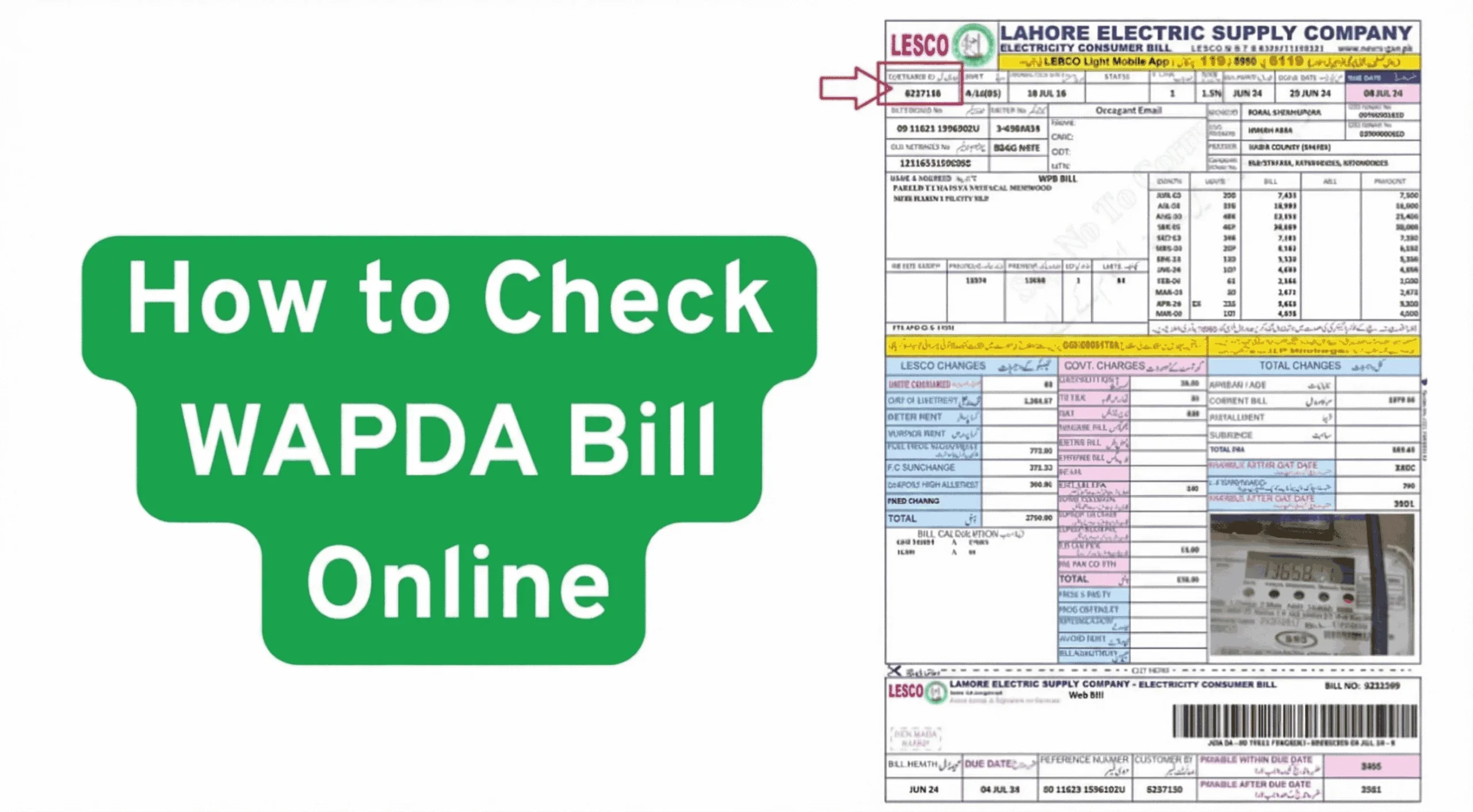
Check WAPDA electricity bill online for all 9 DISCOs in Pakistan. Learn to view, download, and print duplicate bills using reference number or customer ID. Free online bill checking guide for FESCO, LESCO, MEPCO, IESCO, GEPCO, PESCO, and HESCO.
What is WAPDA Bill?
WAPDA (Water and Power Development Authority) originally managed Pakistan’s entire electricity infrastructure from 1958 to 1998. After restructuring, distribution responsibilities transferred to 9 regional Distribution Companies (DISCOs), but consumers still commonly refer to electricity bills as “WAPDA bills.”
Current Reality:
- WAPDA no longer handles billing directly
- 9 DISCOs manage regional electricity distribution
- Each DISCO issues bills under its own name
- “WAPDA bill” remains popular terminology nationwide
Understanding DISCO vs WAPDA Terminology
Historical Context: WAPDA founded in 1958 as unified electricity authority. By 1998, government split operations:
- Generation: WAPDA Hydel and thermal GENCOs
- Transmission: NTDC (National Transmission & Despatch Company)
- Distribution: 9 regional DISCOs
Your Bill Comes From: Not WAPDA directly, but your regional DISCO based on location:
| Your Location | Your DISCO | Check Bill Here |
|---|---|---|
| Faisalabad, Jhang, Sargodha | FESCO | FESCO Bill Online |
| Lahore, Kasur, Sheikhupura | LESCO | LESCO Bill Online |
| Multan, Bahawalpur, DG Khan | MEPCO | MEPCO Bill Online |
| Islamabad, Rawalpindi, Attock | IESCO | IESCO Bill Online |
| Gujranwala, Sialkot, Gujrat | GEPCO | GEPCO Bill Online |
| Peshawar, Mardan, Swat | PESCO | PESCO Bill Online |
| Hyderabad, Mirpurkhas, Badin | HESCO | HESCO Bill Online |
How to Check WAPDA Bill Online – 3 Simple Methods
Method 1: Using Reference Number (Most Common)
Step 1: Locate Reference Number
- Find any previous electricity bill
- Look at top-left corner (usually in red box)
- 14-digit unique code assigned to your connection
Step 2: Identify Your DISCO
Check your bill header to confirm which DISCO serves your area
Step 3: Visit Online Bill Checker
Navigate to your DISCO’s bill checking portal:
- Faisalabad region: Check FESCO bill
- Lahore region: Check LESCO bill
- Multan region: Check MEPCO bill
- Islamabad region: Check IESCO bill
- Gujranwala region: Check GEPCO bill
- Peshawar region: Check PESCO bill
- Hyderabad region: Check HESCO bill
Step 4: Enter Reference Number
Type 14-digit code in the input field (no spaces or dashes)
Step 5: View Results
- Bill amount displays instantly
- Due date shown
- Click “View Full Bill” for complete details
Method 2: Using Customer ID
Alternative Option: If reference number unavailable, use 10-digit Customer ID (Consumer ID)
Where to Find Customer ID:
- Printed on every bill (different location than reference number)
- Permanent account identifier
- Remains constant across billing cycles
Process: Same steps as reference number method, but enter 10-digit Customer ID instead
Method 3: Using Mobile App
DISCO Mobile Apps: Most DISCOs offer official mobile applications:
- Download from Google Play Store or App Store
- Search “[DISCO Name] Bill” (e.g., “LESCO Bill Checker”)
- Install and open app
- Enter reference number or customer ID
- View bill on mobile device
Benefits:
- Faster access on smartphones
- Offline bill saving
- Push notifications for new bills
- Multiple account management
What You Can Check in WAPDA Bill Online
1. Current Bill Details
- Bill Amount: Total payable including all charges
- Due Date: Last date for payment without penalty
- Bill Issue Date: When bill was generated
- Billing Period: Month of electricity consumption
2. Consumption Information
- Current Meter Reading: Latest recorded digits
- Previous Reading: Last month’s reading
- Units Consumed: Difference between readings
- Reading Date: When meter was read
3. Charges Breakdown
- Energy Charges: Base electricity cost per unit
- FPA (Fuel Price Adjustment): Monthly variable charge
- FC Surcharge: Infrastructure financing cost
- TR Surcharge: Tariff rationalization charge
- GST: General Sales Tax (17%)
- TV License Fee: Fixed government fee
- Late Payment Surcharge: If applicable
4. Payment History
- Last 12 Months: Previous bills and payment status
- Paid Bills: Marked with “Bill Paid” stamp
- Outstanding Amounts: Unpaid balance from past months
- Payment Dates: When previous bills were settled
5. Consumer Information
- Consumer Name: Account holder name
- Consumer Address: Registered property location
- Connection Type: Domestic/Commercial/Industrial
- Sanctioned Load: Approved electricity capacity (kW)
- Tariff Category: Billing rate classification
WAPDA Bill Checking by DISCO – Detailed Guides
FESCO Bill Online Check
Coverage: Faisalabad, Jhang, Sargodha, Chiniot, Toba Tek Singh, Mianwali, Khushab, Bhakkar
How to Check:
- Visit FESCO online bill checker
- Enter 14-digit reference number from your FESCO bill
- Click “Check Bill” button
- View bill amount, due date (06th of every month, 2026), and consumption details
- Download PDF or print for payment
FESCO Helpline: 111-000-118
LESCO Bill Online Check
Coverage: Lahore, Sheikhupura, Kasur, Okara, Nankana Sahib
How to Check:
- Visit LESCO bill online checker
- Input your LESCO reference number (14 digits)
- Alternative: Use 10-digit customer ID
- View current bill with all charge details
- Access 12-month payment history
LESCO Helpline: 111-000-118
Special Features:
- LESCO serves 5.7 million customers (largest DISCO)
- Fastest online bill generation
- SMS alert service available
MEPCO Bill Online Check
Coverage: Multan, Bahawalpur, Rahim Yar Khan, Dera Ghazi Khan, Sahiwal, and 8 more South Punjab districts
How to Check:
- Visit MEPCO bill online portal
- Enter MEPCO bill reference number
- View duplicate bill instantly
- Download/print for payment at banks
MEPCO Helpline: 111-111-862
Coverage Note: MEPCO covers 13 districts – largest geographical area among all DISCOs
IESCO Bill Online Check
Coverage: Islamabad Capital Territory, Rawalpindi, Attock, Jhelum, Chakwal
How to Check:
- Visit IESCO online bill service
- Enter 14-digit IESCO reference number
- Check bill amount and due date (07th of every month, 2026)
- Download duplicate bill PDF
IESCO Helpline: 118
Special Note: IESCO serves federal capital and strategic installations
GEPCO Bill Online Check
Coverage: Gujranwala, Gujrat, Sialkot, Narowal, Hafizabad, Mandi Bahauddin
How to Check:
- Visit GEPCO bill checking portal
- Input GEPCO reference number (14 digits)
- View current consumption and charges
- Print bill for offline payment
GEPCO Helpline: 118
PESCO Bill Online Check
Coverage: Entire Khyber Pakhtunkhwa province (24 districts)
How to Check:
- Visit PESCO online bill checker
- Enter PESCO bill reference number
- Check bill details and due date
- Download duplicate copy
PESCO Helpline: 118
Coverage: Serves 4.2 million customers across KPK
HESCO Bill Online Check
Coverage: Hyderabad, Mirpurkhas, Badin, Thatta, Tharparkar, and 6 more Interior Sindh districts
How to Check:
- Visit HESCO bill online service
- Enter 14-digit reference number from HESCO bill
- View bill amount and consumption data
- Print or download for payment
HESCO Helpline: 118
Common WAPDA Bill Checking Issues & Solutions
Issue 1: “Bill Not Found” Error
Possible Causes:
- Reference number entered incorrectly
- New bill not yet generated
- System maintenance ongoing
- Connection recently closed
Solutions:
- Verify 14-digit number is exact (no spaces)
- Try 10-digit customer ID instead
- Check if bill issue date has arrived (usually 1st-5th of month)
- Contact DISCO helpline for verification
Issue 2: Cannot Find Reference Number
Problem: Lost all previous bills, don’t have reference number
Solutions:
- Check SMS: If registered, DISCO sends bill reference via SMS
- Visit Sub-Division Office: Provide CNIC and address to retrieve reference number
- Contact Helpline: Call DISCO customer support with consumer details
- Check Meter Reading Card: Some DISCOs print reference on meter cards
Where Reference Number Located:
- Top-left corner of bill (most DISCOs)
- Inside red or colored box
- Above consumer name section
- Format: 14 continuous digits (no dashes)
Issue 3: Wrong Bill Amount Displayed
Problem: Bill amount seems incorrect or too high
Verify These:
- Check Meter Reading: Compare reading on bill with actual meter
- Review Units Consumed: Calculate difference between current and previous reading
- Examine Charges: Look for unusual FPA or surcharges
- Check Bill History: Compare with same month previous year
If Still Wrong:
- Take photo of meter reading
- Visit Sub-Division office with complaint
- Request meter testing (free if meter faulty)
- DISCO will adjust bill if error confirmed
Issue 4: Old Bill Checking
Problem: Need to view previous month’s bill or payment history
Solution: When checking online, full bill view includes:
- Last 12 months payment history
- Each month’s bill amount
- Paid vs unpaid status
- Payment dates
Access Old Bills:
- Enter current reference number
- View full bill details
- Scroll to payment history section
- See complete 12-month record
For bills older than 12 months, visit DISCO office with consumer ID
Issue 5: Bill Checking Without Reference Number
Common Question: “Can I check bill using CNIC, name, or address?”
Answer: No. DISCO policy requires either:
- 14-digit reference number, OR
- 10-digit customer ID
Why This Restriction?
- Privacy protection
- Security against unauthorized access
- Prevents identity fraud
- Ensures accurate bill retrieval
No Alternative Methods Available:
- CNIC number won’t work
- Consumer name won’t work
- Address won’t work
- Meter number won’t work
Only Solution: Retrieve reference number from previous bill or DISCO office
How to Download & Print WAPDA Bill
Downloading PDF Copy
Step 1: Check bill using reference number on your DISCO portal:
- FESCO bill for Faisalabad region
- LESCO bill for Lahore region
- MEPCO bill for Multan region
- IESCO bill for Islamabad region
- GEPCO bill for Gujranwala region
- PESCO bill for Peshawar region
- HESCO bill for Hyderabad region
Step 2: Click “View Full Bill” button
Step 3: Wait for PDF to load (5-10 seconds)
Step 4: Click download icon or right-click → “Save as”
Step 5: Save to device storage
Printing Duplicate Bill
Method 1: Direct Print from Browser
- After viewing full bill PDF
- Click browser’s print icon (Ctrl+P)
- Select printer
- Adjust print settings (usually A4 size)
Method 2: Download Then Print
- Save PDF to computer/mobile
- Open in PDF reader
- Use print function
- Print high-quality copy
Bill Validity: Online duplicate bill is valid for all payment purposes at:
- Bank branches
- ATMs
- Mobile banking apps
- DISCO collection centers
No Stamp Required: Digital bills accepted universally
WAPDA Bill Payment After Checking Online
Online Payment Methods
1. Mobile Banking (Fastest)
JazzCash:
- Open app → Bill Payment
- Select Electricity → Choose DISCO
- Enter reference number
- Confirm amount → Pay
- Instant confirmation
EasyPaisa:
- Login → Bills section
- Tap Electricity
- Select DISCO → Enter reference
- Complete payment
Other Mobile Wallets:
- NayaPay, SadaPay, SimSim support DISCO payments
- Same process across all apps
- Zero service charges
2. Internet Banking
- Login to bank portal (HBL, UBL, MCB, ABL, etc.)
- Navigate to bill payment section
- Select DISCO from utility list
- Enter 14-digit reference number
- Verify amount and pay
- Save transaction receipt
3. ATM Payment
- Insert card at any bank ATM
- Select “Bill Payment”
- Choose “Electricity”
- Select your DISCO
- Enter reference number
- Confirm amount and complete
- Collect printed receipt
Offline Payment Options
1. Bank Branches
- Visit any branch of participating banks
- Present printed bill or reference number
- Pay via cash or cheque
- Collect payment receipt
2. DISCO Collection Centers
- Sub-Division offices
- Division offices
- Headquarters customer care
- Pay during business hours (9 AM – 4 PM)
3. Post Offices
- Pakistan Post accepts bills nationwide
- Show bill copy or reference number
- Pay in cash
Benefits of Checking WAPDA Bill Online
1. Instant Access 24/7
- No waiting for postal delivery
- Check anytime from anywhere
- No office visits required
2. Zero Cost Service
- Completely free bill checking
- No charges for viewing or downloading
- Unlimited access
3. Environment Friendly
- Reduces paper consumption
- Digital record keeping
- No physical storage needed
4. Payment Convenience
- View before due date
- Plan finances in advance
- Avoid late payment surcharge
5. Historical Data Access
- 12-month payment history
- Track consumption patterns
- Compare seasonal usage
6. Quick Complaint Resolution
- Detect billing errors early
- Report discrepancies before due date
- Evidence for dispute resolution
7. Multiple Account Management
- Check bills for multiple properties
- Monitor tenants’ consumption
- Track commercial connections
WAPDA Bill Structure Explained
Front Page Information
Consumer Details Section:
- Consumer name and father’s name
- Complete registered address
- Connection type (Domestic/Commercial)
- Sanctioned load capacity
- Tariff category
Bill Summary Box:
- Previous month’s arrears (if any)
- Current month charges
- Late payment surcharge
- Total amount payable
- Due date (critical – pay before this!)
Meter Information:
- Meter number
- Current reading
- Previous reading
- Units consumed (difference)
- Reading date
Charges Detail Section
Energy Charges Calculation: Shows slab-wise breakdown:
- First 50 units @ Rs X
- Next 50 units @ Rs Y
- Remaining units @ Rs Z
- Total energy charges
Variable Charges:
- Fuel Price Adjustment (FPA)
- Quarterly Tariff Adjustment (QTA)
- FC Surcharge
- TR Surcharge
Taxes:
- GST on electricity (17%)
- GST on FPA (17%)
- TV license fee
- Other provincial duties
Back Page Information
Payment History Table: Shows last 12 months:
- Month/year
- Bill amount
- Payment status (Paid/Unpaid)
- Payment date
Important Instructions:
- Payment methods accepted
- Late payment penalty details
- Helpline numbers
- Office addresses
Check Your WAPDA Bill Now – Quick Links
Select your area to check bill instantly:
Punjab – Central:
- FESCO Bill – Faisalabad, Jhang, Sargodha
- LESCO Bill – Lahore, Kasur, Sheikhupura
- GEPCO Bill – Gujranwala, Sialkot, Gujrat
Punjab – South:
- MEPCO Bill – Multan, Bahawalpur, DG Khan
Capital Region:
- IESCO Bill – Islamabad, Rawalpindi
KPK:
- PESCO Bill – Peshawar, Mardan, Swat
Sindh:
- HESCO Bill – Hyderabad, Mirpurkhas
Frequently Asked Questions
Q: Is WAPDA bill same as DISCO bill?
A: Yes. “WAPDA bill” is common terminology, but actual bills are issued by regional DISCOs. Both terms refer to the same electricity bill.
Q: Can I check WAPDA bill online without reference number?
A: No. Either 14-digit reference number or 10-digit customer ID is mandatory. CNIC or name cannot be used.
Q: How to get WAPDA duplicate bill?
A: Enter reference number on your DISCO’s online portal, view full bill, and download PDF copy. This is your official duplicate bill.
Q: Which banks accept WAPDA bill payment?
A: All major banks (HBL, UBL, MCB, ABL, Meezan, Standard Chartered) and mobile banking apps accept DISCO payments.
Q: What is WAPDA bill due date for December 2026?
A: Most DISCOs: 06th of every month, 2026. IESCO/PESCO: 07th of every month, 2026. Pay before due date to avoid 10% surcharge.
Q: Can I check old WAPDA bills online?
A: Yes. When viewing current bill, payment history section shows last 12 months’ bills with amounts and payment status.
Q: How to register mobile number for bill SMS?
A: Visit your DISCO’s Sub-Division office with CNIC and provide active mobile number for registration. Free SMS service activated.
Visit Sim owner details for verification unknowns sims
 SIM OWNER DETAILS