
A young woman from Karachi contacted me last week in a panic. Her bank had called her to say that a loan application had been submitted in her name from a mobile number she had never owned. When she checked her CNIC, she found four SIM cards registered under her identity across two different networks — she personally owned only one.
Someone had used her CNIC details, obtained from a leaked photocopy she had given to a property agent months earlier, to register three unauthorized SIM cards. One of those SIMs had been used to apply for a fraudulent Rs. 50,000 mobile loan. She was now legally connected to that loan application until she could prove the SIM was not hers.
The entire problem could have been caught and stopped months earlier — in 30 seconds — if she had checked what SIMs were on her CNIC before the damage was done.
Knowing how to check SIMs on your CNIC in Pakistan is one of the most important digital safety habits every citizen must develop in 2026. This complete guide covers every official free method, explains exactly what each result means, and tells you precisely what to do when something looks wrong.
Why You Must Check SIMs on Your CNIC Regularly
Your CNIC is Pakistan’s most powerful identity document. Every SIM card in the country must be permanently linked to a CNIC through NADRA’s biometric verification system. This means your CNIC is not just a card in your wallet — it is your digital identity across every mobile network in Pakistan simultaneously.
The problem is that your CNIC number and a photograph of your CNIC are routinely shared in everyday Pakistani life. You give it to landlords, employers, banks, schools, shops, phone franchise staff, and dozens of other places every year. Every time that information leaves your hands, there is a risk that someone with access to it could attempt to register a SIM card in your name.
PTA reported in early 2026 that over 2.3 million Pakistanis currently have unauthorized SIM cards registered on their CNICs. Many of these registrations happened through compromised franchise staff, leaked photocopies, or fraudulent use of biometric bypass methods. The CNIC holders in most of these cases have no idea the unauthorized SIMs exist.
Under Pakistani law, you are legally responsible for all activities conducted through every SIM registered on your CNIC — until you formally report and remove any unauthorized registrations. This means checking your CNIC SIMs is not optional. It is a legal necessity.
How Many SIMs Can Be On Your CNIC? — PTA Rules 2026
Before checking, you need to know what a normal result looks like. PTA enforces strict limits on SIM registrations per CNIC to prevent misuse.
| Operator | Maximum SIMs Allowed Per CNIC |
|---|---|
| Jazz (Mobilink) | 5 |
| Zong (CMPak) | 5 |
| Telenor Pakistan | 5 |
| Ufone (PTCL) | 5 |
| SCO | 5 |
| Total Across All Operators | 25 |
Any SIM registration that pushes a single operator’s count above 5 on your CNIC is automatically blocked by PTA’s DIRBS system without any warning or notification to you. This means if a criminal registers 6 Jazz SIMs on your CNIC, PTA’s system will auto-block one of them — but it may block YOUR legitimate SIM rather than the criminal’s unauthorized ones, depending on registration sequence.
When you check your CNIC and receive results, compare the count shown for each operator against the SIM cards you personally own from that operator. Any number above your personal count means unauthorized registration has occurred.
Method 1 — SMS 668: The Fastest Free Method (30 Seconds)
This is the single most important method every Pakistani should know. It is official, completely free, requires no internet, and works on any phone — basic feature phone or smartphone — on any network.
Step 1: Open the SMS messaging app on your phone. It does not matter which network SIM you use to send this message — Jazz, Zong, Telenor, Ufone, and SCO all work equally.
Step 2: Type your complete 13-digit CNIC number without any dashes, spaces, or extra characters. Your CNIC card shows it as 35201-1234567-1 — type it as 3520112345671 with no dashes.
Step 3: Send this message to shortcode 668.
Step 4: Wait 5 to 30 seconds. During busy hours the reply may take up to 60 seconds. If no reply arrives within 2 minutes, try sending again.
Step 5: Read the reply carefully. It will show something like this:
“Dear Customer, SIMs registered on CNIC 3520112345671: Total: 4 — Jazz: 2, Zong: 1, Telenor: 1, Ufone: 0, SCO: 0”
How to interpret your result: Write down how many SIM cards you personally own from each operator. Compare this against the numbers in the reply one by one. If Jazz shows 2 but you only own 1 Jazz SIM — one unauthorized Jazz SIM exists. If Zong shows 1 but you own no Zong SIMs — one unauthorized Zong SIM exists. Any discrepancy requires immediate action.
This service is 100% free of charge. No amount is deducted from your balance regardless of which network you use to send the message.
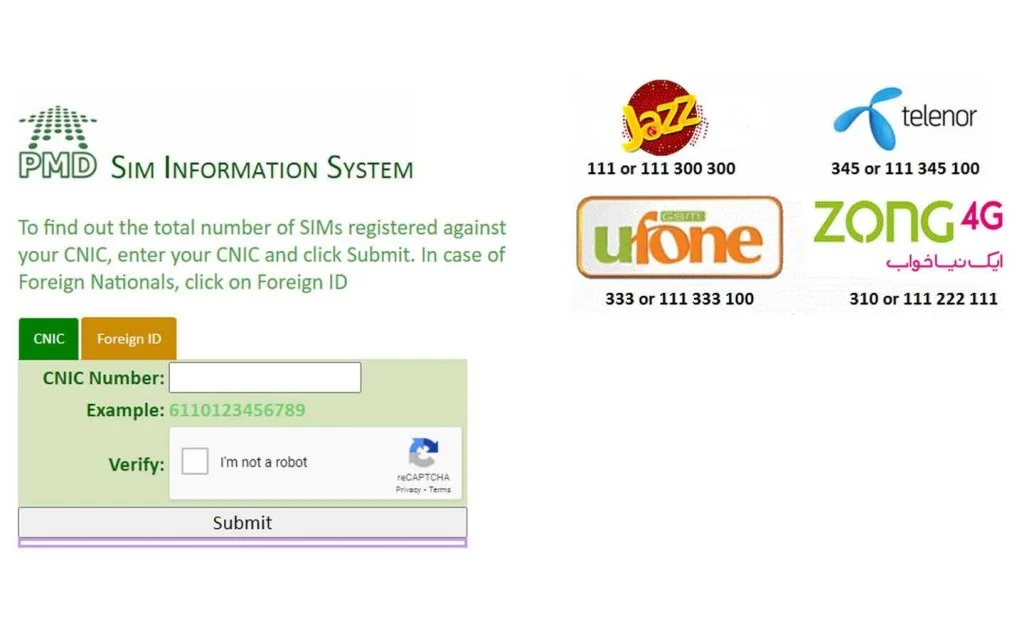
Method 2 — PTA Online Portal (Most Detailed View)
For a more detailed, operator-by-operator visual breakdown of all SIMs on your CNIC, the PTA online portal provides more information than the SMS method alone — including registration status for each SIM and whether any are flagged as inactive or blocked.
Step 1: Visit sim owner details and use the free SIM checking tool on our homepage. This tool connects directly to PTA’s verified database.
Step 2: Enter your CNIC number in the search field on the homepage.
Step 3: Complete the quick verification step shown on screen.
Step 4: View a complete, organized breakdown of all SIM cards currently registered on your CNIC — showing each operator separately with registration status, active or inactive state, and any irregularities flagged by PTA’s monitoring system.
This method requires an internet connection but gives significantly more information than the SMS 668 method alone. It is the best choice when you want to see the full picture clearly displayed rather than reading through an SMS reply.
Method 3 — Check SIMs on CNIC Through Each Operator App
If you want to check SIMs on your CNIC specifically for one network at a time — with full details including actual SIM numbers, activation dates, and biometric status — the official operator apps provide the most complete information for your own registered SIMs.
Jazz SIMs on Your CNIC: Download My Jazz from Play Store (developer: Jazz Mobilink). Log in with your Jazz number. Go to My Profile → SIM Details. See all Jazz SIMs linked to your CNIC with registration dates and biometric verification status.
Zong SIMs on Your CNIC: Download Zong App from Play Store (developer: Zong CMPak). Log in with your Zong number. Go to Account → My Information. View all Zong SIMs registered to your CNIC with account details.
Telenor SIMs on Your CNIC: Download My Telenor from Play Store (developer: Telenor Pakistan). Log in with your Telenor number. Go to Profile → SIM Registration. See complete registration details for your Telenor SIMs.
Ufone SIMs on Your CNIC: Download My Ufone from Play Store (developer: Ufone PTCL). Log in with your Ufone number. Go to Account → My SIMs. View all Ufone SIM registrations linked to your CNIC.
The limitation of this method is that each app only shows that specific operator’s SIMs — you cannot see across all networks from one app. Use SMS 668 or our portal for a complete cross-network picture.
Method 4 — USSD Codes to Check SIMs on CNIC
For people without internet access or who prefer not to use apps, each operator provides a USSD code to check SIM registration details for their network specifically.
| Operator | USSD Code | What to Select |
|---|---|---|
| Jazz | Dial *99# | Select option 3 → SIM Information |
| Zong | Dial *102# | Select Account Details |
| Telenor | Dial *345# | Select SIM Details |
| Ufone | Dial *336# | Select Account Info |
Dial the code from a SIM on that specific network. Navigate the menu that appears on screen and select the SIM information option. You receive an SMS within 1 to 2 minutes showing registration details for that operator’s SIM on your CNIC.
This method requires no internet and works even in areas with poor data coverage. It is particularly useful in rural areas of Punjab, Sindh, KPK, and Balochistan where mobile data is unreliable.
Method 5 — Operator Helplines for Assisted CNIC SIM Check
If you prefer to speak with a representative rather than using self-service methods, all four major operators provide free helplines that can assist with CNIC SIM checks during business hours.
| Operator | Helpline Number | Free From | Best Call Time |
|---|---|---|---|
| Jazz | 111 | Jazz numbers | 9 AM – 6 PM weekdays |
| Zong | 310 | Zong numbers | 9 AM – 6 PM weekdays |
| Telenor | 345 | Telenor numbers | 9 AM – 6 PM weekdays |
| Ufone | 333 | Ufone numbers | 9 AM – 6 PM weekdays |
When you call, tell the representative you want to verify what SIM cards are registered on your CNIC for their network. After confirming your identity through standard security questions, they will provide the registration details for SIMs on their network linked to your CNIC.
Helplines are useful when you want human confirmation before taking action on a suspected unauthorized registration, or when you need additional details beyond what the SMS and app methods show.
Method 6 — Service Center Visit for Full SIM List and Documentation
The only method that reveals the actual mobile numbers registered on your CNIC — not just the count — is visiting an operator’s service center with your original CNIC. This is also the method that produces legally valid printed documentation.
Step 1: Visit the nearest service center of any operator whose SIM count on 668 is higher than your personal SIMs.
Step 2: Bring your original CNIC. No photocopy, no expired card, no photo on phone — the original physical document is mandatory.
Step 3: Request a “CNIC SIM Registration Printout” or “All SIMs on CNIC Report.”
Step 4: Complete biometric verification at the counter to confirm you are the legitimate CNIC holder.
Step 5: Receive a printed list showing every mobile number registered on your CNIC on that network, including activation dates, registration locations, and current status for each.
Step 6: Compare this printed list against your personal SIMs. Any number you do not recognize is an unauthorized registration. Request “SIM Disowning” for each unauthorized number at the same counter during the same visit — the service center staff will process both the report and the blocking request together.
This method takes 15 to 20 minutes per operator but gives you the most complete and actionable information available — the actual unauthorized numbers, not just the count.
What to Do When You Find Unauthorized SIMs on Your CNIC
If any method reveals more SIMs than you personally own on any operator, follow this exact process without delay.
Immediate Step — Request SIM Disowning at Operator Service Center. Visit the service center of the operator showing unauthorized SIMs. Bring your original CNIC. Use the exact phrase “SIM Disowning Request” at the counter. Complete biometric verification. The operator must submit the blocking request to PTA immediately.
Within 48 Hours — Confirm Removal. Send your CNIC to 668 again. The count should now match your personal SIMs exactly. If it does not, return to the service center and ask for the status of your disowning request — they are legally required to process it within 48 hours under PTA regulations.
If Financial Fraud Has Occurred — File FIA Complaint Immediately. If the unauthorized SIM was used for mobile wallet transactions, loan applications, banking OTP bypass, or any other financial activity — file a complaint with FIA Cybercrime at complaint.fia.gov.pk. Provide the operator name, your CNIC, and any evidence of fraudulent activity. FIA has legal authority to trace the person who registered the unauthorized SIM through official PTA records.
Ongoing — Check Every 3 Months. Make it a habit to send your CNIC to 668 every three months. It takes 30 seconds and could save you from months of legal and financial consequences. Many Pakistanis who discovered unauthorized SIMs caught them early enough that no fraud had yet been committed — purely because they checked regularly.
Comparison of All Methods to Check SIMs on CNIC
| Method | Internet Needed | Phone Type | Time | Shows Actual Numbers | Cost |
|---|---|---|---|---|---|
| SMS CNIC to 668 | No | Any phone | 30 seconds | No — count only | Free |
| PTA portal / simownerdetailss.org.pk | Yes | Any device | Instant | No — count + status | Free |
| Operator apps | Yes | Smartphone | Instant | Yes — your own SIMs | Free |
| USSD code | No | Any phone | 1-2 minutes | No — status only | Free |
| Operator helpline | No | Any phone | 2-5 minutes | No — count + status | Free |
| Service center visit | No | Not needed | 15-20 minutes | Yes — full list | Free |
Frequently Asked Questions
Q1: How do I check how many SIMs are registered on my CNIC in Pakistan?
Send your 13-digit CNIC number without dashes via SMS to 668. Within 30 seconds you receive a complete reply showing the total SIMs on your CNIC and the count for each operator — Jazz, Zong, Telenor, Ufone, and SCO separately. This is completely free and works on any phone without internet.
Q2: Can I check SIMs on someone else’s CNIC?
The SMS 668 method works for any CNIC number you enter. However, checking another person’s CNIC registrations without their knowledge or consent raises serious legal concerns under PECA 2016. This method should only be used for your own CNIC or the CNIC of an immediate family member you are responsible for protecting.
Q3: What does it mean if 668 shows more SIMs than I own?
It means at least one SIM card has been registered on your CNIC by someone other than you — without your knowledge or authorization. Visit the relevant operator’s service center immediately with your original CNIC and request SIM Disowning for the unauthorized registrations.
Q4: How do I find out the actual phone numbers of unauthorized SIMs on my CNIC?
Send your CNIC to 668 to confirm unauthorized registrations exist, then visit the relevant operator’s service center with your original CNIC. Request a “CNIC SIM Registration Printout” — this gives you the actual mobile numbers, not just the count. The service center can also process the SIM Disowning request immediately during the same visit.
Q5: How long does it take to remove unauthorized SIMs from my CNIC?
Operators are required by PTA regulations to process SIM Disowning requests within 24 to 48 hours of receiving your verified request with original CNIC. Confirm removal by sending your CNIC to 668 again after 48 hours.
Q6: I checked 668 and the count is correct but I received a message saying one of my SIMs was auto-blocked. Why?
PTA’s DIRBS system automatically blocks SIMs that exceed the per-operator limit of 5 per CNIC. If your count was previously above 5 for any operator, DIRBS may have already blocked one. Visit the relevant operator’s service center to identify which SIM was blocked and to confirm whether it was an unauthorized SIM or one of your legitimate ones.
Q7: Should I check SIMs on my CNIC if I have never given my CNIC to anyone suspicious?
Yes — absolutely. CNIC photocopies are routinely shared for completely ordinary activities including bank account opening, mobile purchases, property rental, school admissions, and employment verification. Any of these legitimate uses creates copies that could potentially be misused. Checking your CNIC takes 30 seconds and costs nothing — there is no reason not to do it regularly.
Final Summary
Checking SIMs on your CNIC in Pakistan takes 30 seconds and costs nothing. The official SMS 668 method is available to every Pakistani on any phone without internet at any time of day or night. There is no simpler or more important digital safety action you can take right now.
Send your CNIC to 668 today. If the results match your personal SIMs exactly — you are safe. If any number is higher than your personal SIM count — act immediately by visiting the operator’s service center and requesting SIM Disowning.
For the most complete visual breakdown of your CNIC’s SIM registrations across all networks, use our free tool at pak sim data — it takes less than one minute and shows you the full picture clearly.
To understand your full legal rights around SIM registrations and what ownership means under Pakistani law, read our complete guide on checking SIM ownership in Pakistan. And for the complete list of every official method to check SIM owner details in Pakistan, our step-by-step guide covers all 7 official methods in full detail.
 SIM OWNER DETAILS